
Search “blocked drain near me” on your phone. Look at the first two ads.
One is three lines of text. The other has a call button, four extra links, a photo, a logo and a line saying “Licensed and insured”. It fills most of the screen.
Both advertisers pay per click in the same way. The second one filled in the Assets screen. (And ranks high enough for Google to show it all. More on that below.)
Google calls these add-ons assets. Most people still call them extensions. This post shows you what each one looks like, who it suits and where it bites.
There’s a deadline in here too. Google stopped letting anyone create call-only ads in February 2026. The ones still running switch off in February 2027. So if the phone is how you get work, your number needs a new home.
Running Facebook ads as well? I wrote the same kind of guide for Facebook’s browser add-ons.
What are Google Ads assets?
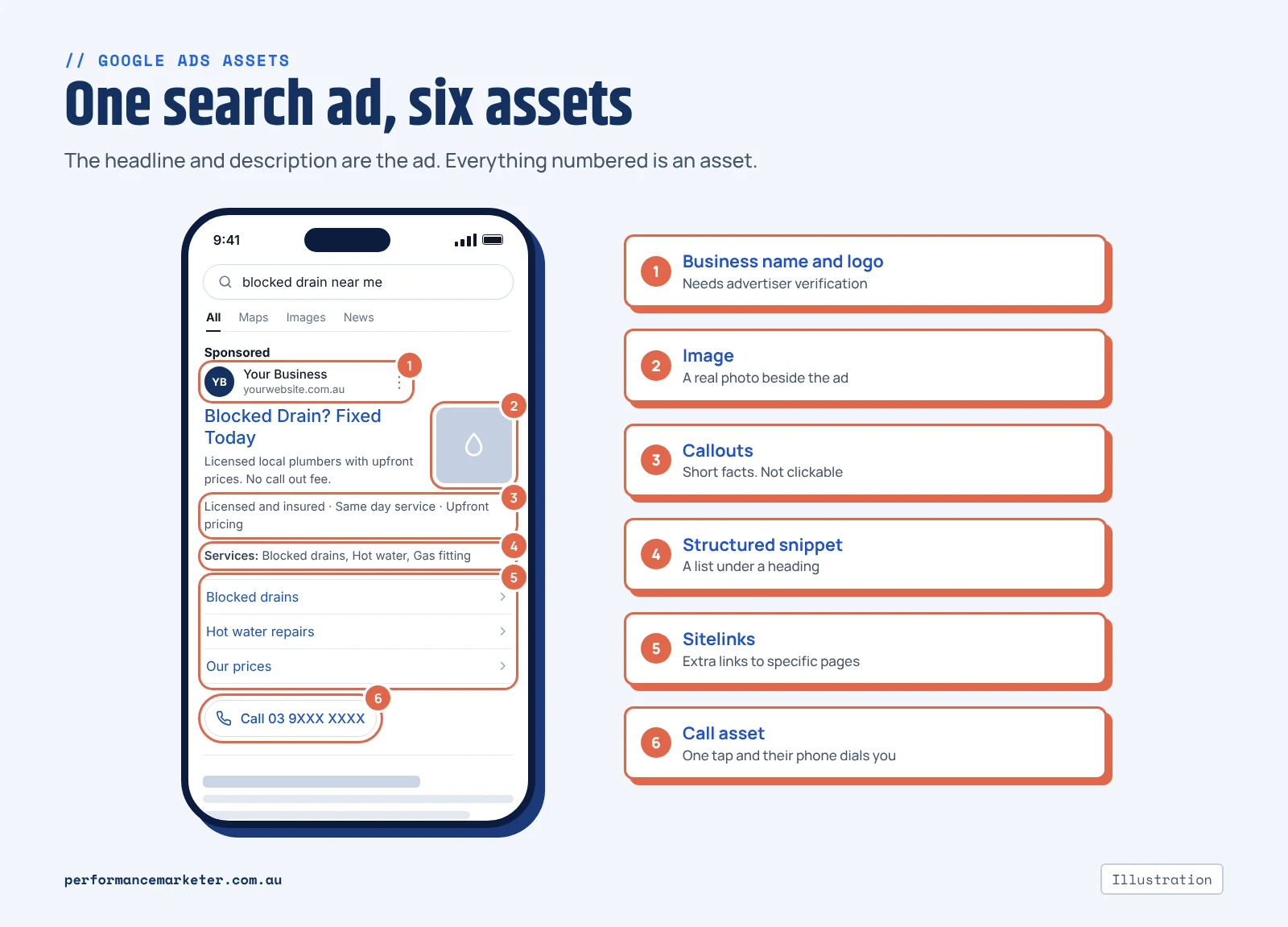
Assets are the extra bits Google can attach to a search ad. A phone number. More links. A form. Your prices. Your logo.
They used to be called extensions. Google renamed them in 2022. So a “sitelink extension” and a “sitelink asset” are the same thing.
(Confusingly, Google now calls your headlines and descriptions assets too. In this post I mean the add-ons.)
Three things to know before we go through them.
They’re free to add. You pay when someone clicks one, same as a click on the headline. And Google says it won’t charge for more than two clicks each time your ad shows.
They don’t show every time. Google decides search by search. It looks at your Ad Rank and whether it expects the asset to help. Ads near the top get first go. So you can write six sitelinks and see two. Or none. That’s normal.
Google can write some for you. It builds them from your website, and they’re switched on by default. Have a read of what’s been written in your name. If you’ve turned on AI Max, Google writes more of the ad text too.
I’ve left out app assets and text disclaimers. Most local businesses won’t need either.
What happens when someone taps your ad
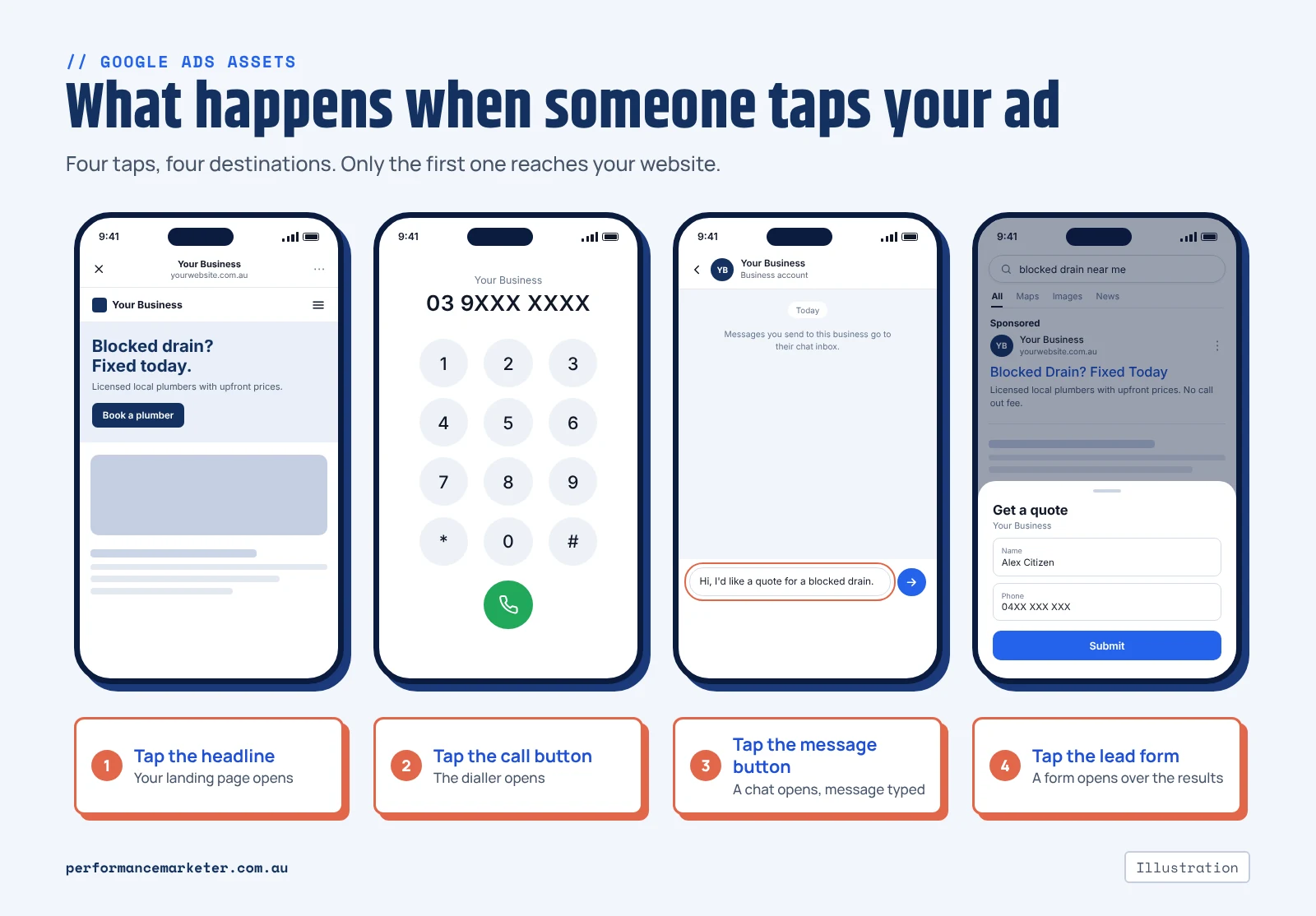
On Facebook, the add-ons sit on your landing page. On Google they sit on the ad itself, right there in the search results. So some people never reach your website at all.
→ Tap the headline: your landing page opens, as usual.
→ Tap the call button: the dialler opens with your number in it.
→ Tap the message button: a chat opens with the first message already typed.
→ Tap the lead form: a form opens over the search results.
→ Tap a sitelink: that page opens in place of your main landing page.
Callouts and structured snippets are plain text. Tap them and nothing happens.
Why does this matter? Tracking. A call, a chat or a form that starts on the ad never touches your website. So your website’s tracking never sees it. I’ll come back to that.
The three assets that can get you a lead
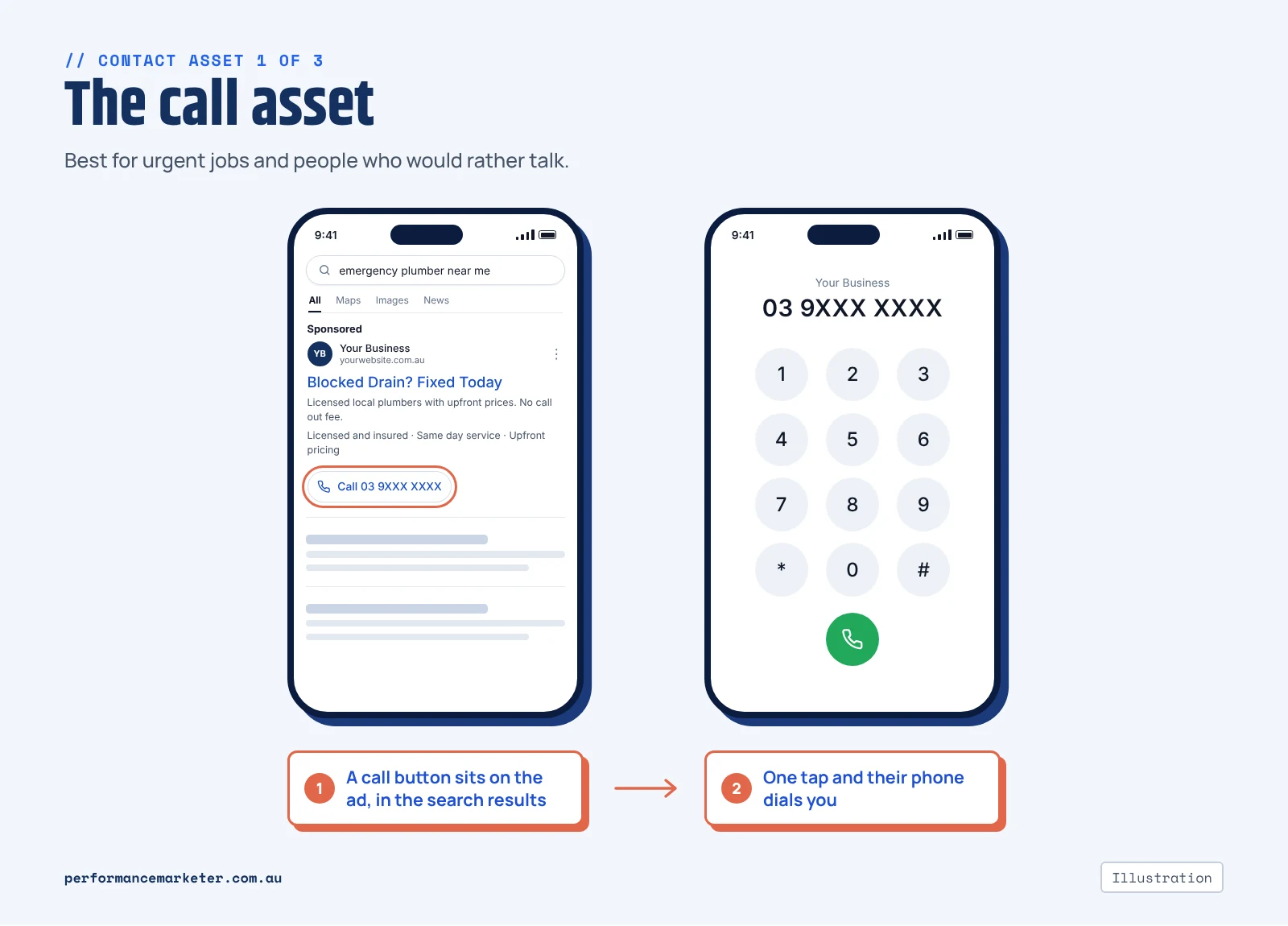
1. The call asset (call extension)
Your phone number, or a call button, on the ad. On a phone, one tap starts the call. On a computer, a click shows the number with a QR code to scan.
This is what replaces call-only ads. There’s one difference, and it matters.
A call-only ad gave people one option. Ring you. An ad with a call asset gives them two. Ring you, or tap the headline and look at your site first.
So some people who would have called will now read the website. For most businesses I think that’s fine. Someone who has seen your reviews and prices is an easier call.
But if call-only ads have been bringing you cheap calls, expect the mix to shift. I’d move well before February 2027. Run both side by side for a while and compare.
It suits urgent and appointment work. Plumbers, electricians, locksmiths, dentists, physios.
The catch? Someone has to pick up. You can set the number to show only when the phone is staffed. I’d do that first.
2. The message asset (message extension)
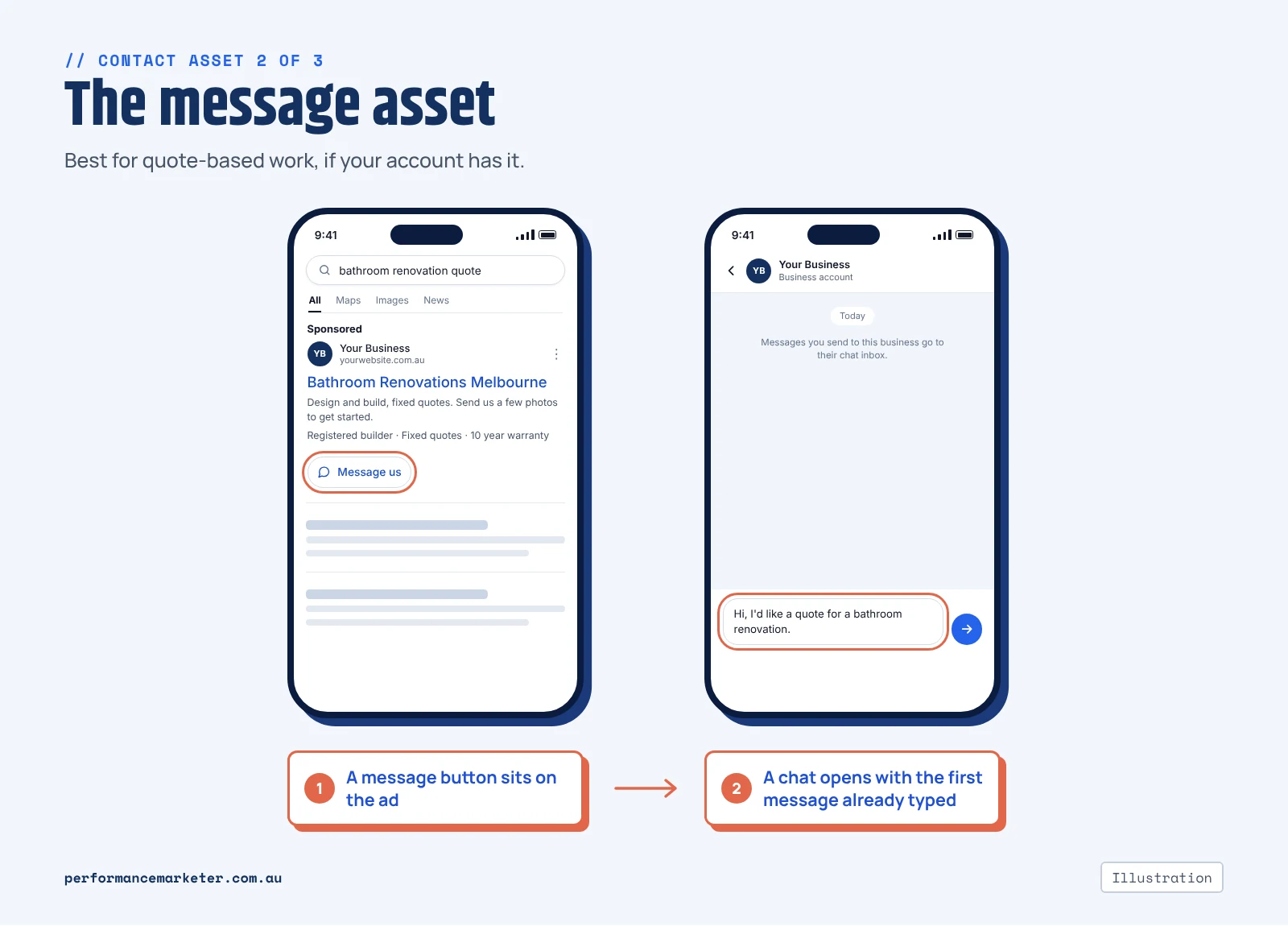
A button on the ad that opens a chat.
Google’s setup lets you send people to WhatsApp, SMS, Facebook Messenger or Zalo. You write the first message for them (“Hi, I’d like a quote for…”), so all they do is hit send. It works on Search and Performance Max campaigns.
It suits quote-based work. Plenty of people would rather send three photos of the bathroom than describe it over the phone.
Realistically, you may not have it yet. Google still lists it as a beta. Your account needs advertiser verification. And it isn’t offered to every account. As I write this, it isn’t showing in the Australian accounts we manage.
The quick check is step 2 of the setup list further down. No “Message” in the list? Your account doesn’t have it.
The rule from Facebook’s chat button applies here too. If nobody replies for three hours, that person has messaged someone else.
One odd detail from Google’s own instructions. Don’t name the messaging app in your headline. Some people who tap the ad land on your website, not in the chat. A headline that says “WhatsApp us” will confuse them.
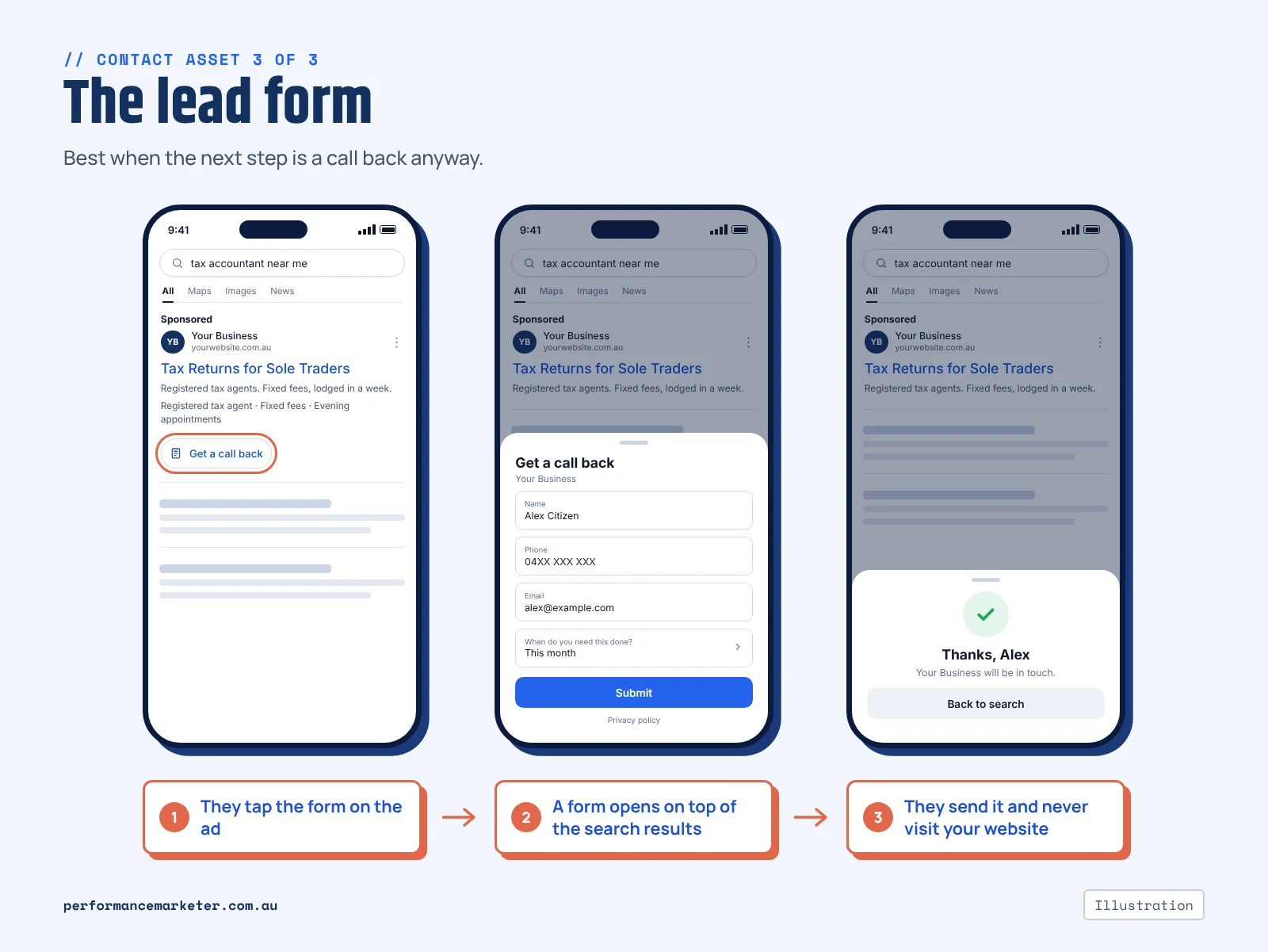
3. The lead form (lead form extension)
A form that opens on Google, straight from the ad. Name, phone, email, plus any questions you add. The person never visits your website.
On Search there are two ways to run it. The form can sit under the ad as an extra. Or the headline itself can open the form.
The second way has extra requirements. You need advertiser verification and some spend history. (Google’s help page currently says more than US$1,000 in the account.) Google’s policy page for Australia still lists an older $50,000 route as well. So check what your own account offers.
It suits professional services where the next step is a call back anyway. Accountants, brokers, lawyers, B2B.
A few catches.
Google’s lead form policy has a list of restricted categories, and healthcare and medicines is on it. If you run a clinic, check before you plan around one.
These leads are easy to send, which cuts both ways. Add one question that makes people stop and think. “When do you need this done?” works.
And the leads sit inside Google Ads. Google keeps them for 60 days. The download only reaches back 30. So set up the email notification, or a webhook into your CRM, on day one. Otherwise they sit in a table until somebody remembers to look.
The extras: sitelinks, callouts and the rest
None of these gets you a lead on its own. What they do is give people more reasons to pick your ad. They also take up room that would otherwise go to the next advertiser.
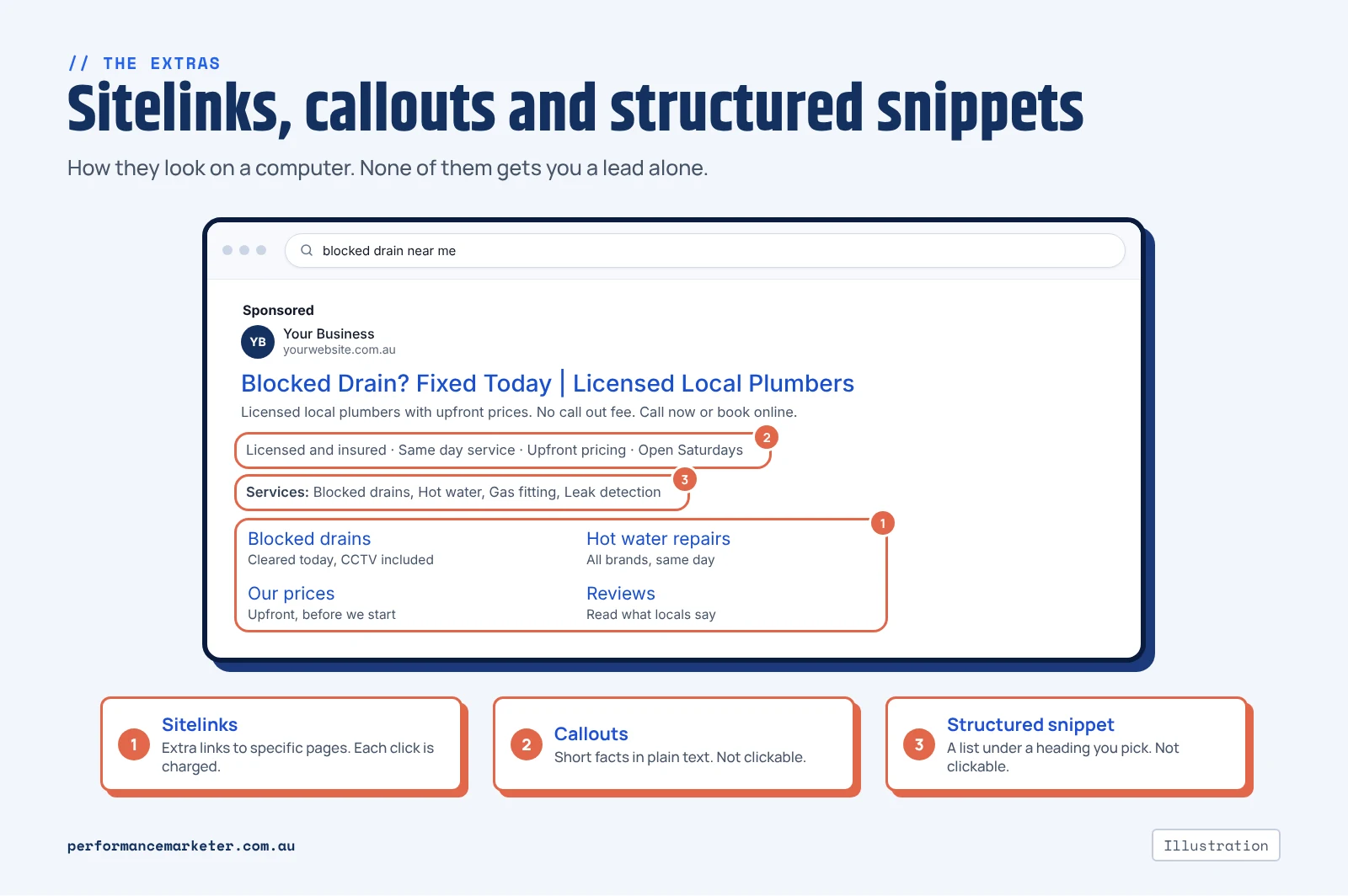
Sitelinks (sitelink extensions)
Extra links under the ad that go to specific pages. Services. Pricing. Reviews. Contact.
You need at least two before any will show. Google can show up to six on a computer and eight on a phone. Each gets 25 characters of link text, plus two short description lines. Fill those in.
I’d write six.
A common mistake is pointing sitelinks at pages that can’t take an enquiry. A blog post. An About page with no phone number. A sitelink click costs the same as a headline click, so send it somewhere that can pay you back.
Callouts and structured snippets
Callouts are short lines of plain text, 25 characters each. “Licensed and insured”. “Same day service”. “Open Saturdays”. You need at least two before they show.
Structured snippets are a list under a heading. You pick the heading from Google’s set: Services, Types, Brands and so on. For example, “Services: Blocked drains, Hot water, Gas fitting, Leak detection”. Google recommends at least four items per heading.
Neither can be tapped, so neither costs you a click.
To be fair, they also do the least by themselves. Their job is to answer the small questions before the click. Are you licensed? Do you do my kind of job?
Keep them factual. “Quality service” tells nobody anything.
Location (location extension)
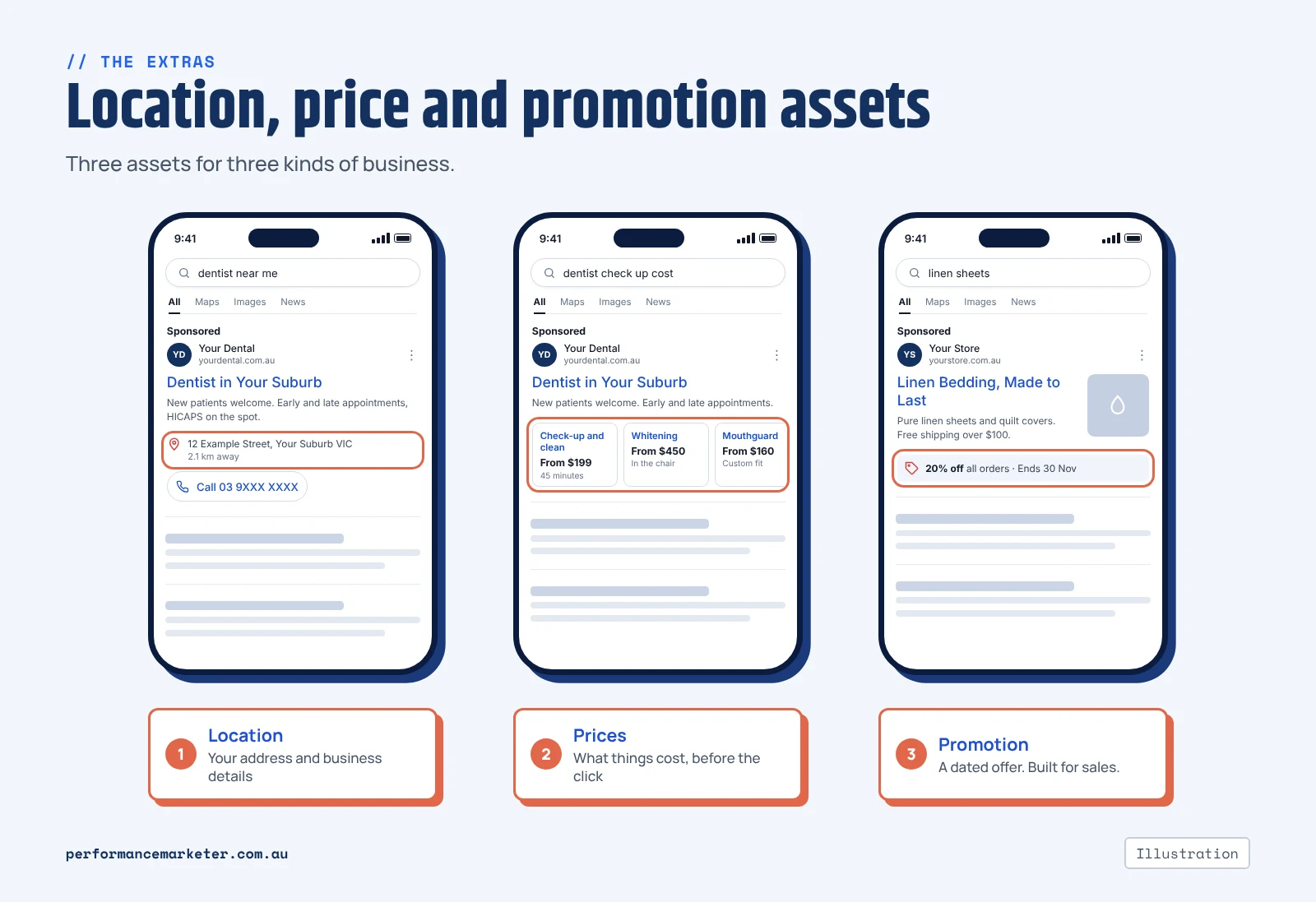
Your address, a call button and a link to your business details. It all comes from your Google Business Profile.
Worth having if people come to you. Clinics, shops, offices.
One thing to watch. If you run call and location assets together, Google may send the call to the number on the location. Make sure that’s a number you’re tracking.
Prices and promotions
Price assets list your services or products with a price on each. People see what things cost before they click.
Good for fixed-price work. A check-up and clean. A tax return. A hot water service. Not much use if every job is quoted.
Promotion assets show a limited-time offer. A dollar amount or a percentage off, with dates. They’re built for sales, so online stores get the most out of them.
Images, business name and logo
Image assets put a photo beside the ad. Google suggests uploading at least four, in both square and landscape shapes.
Use real photos. Your work, your team, your clinic. Stock photos look like stock photos.
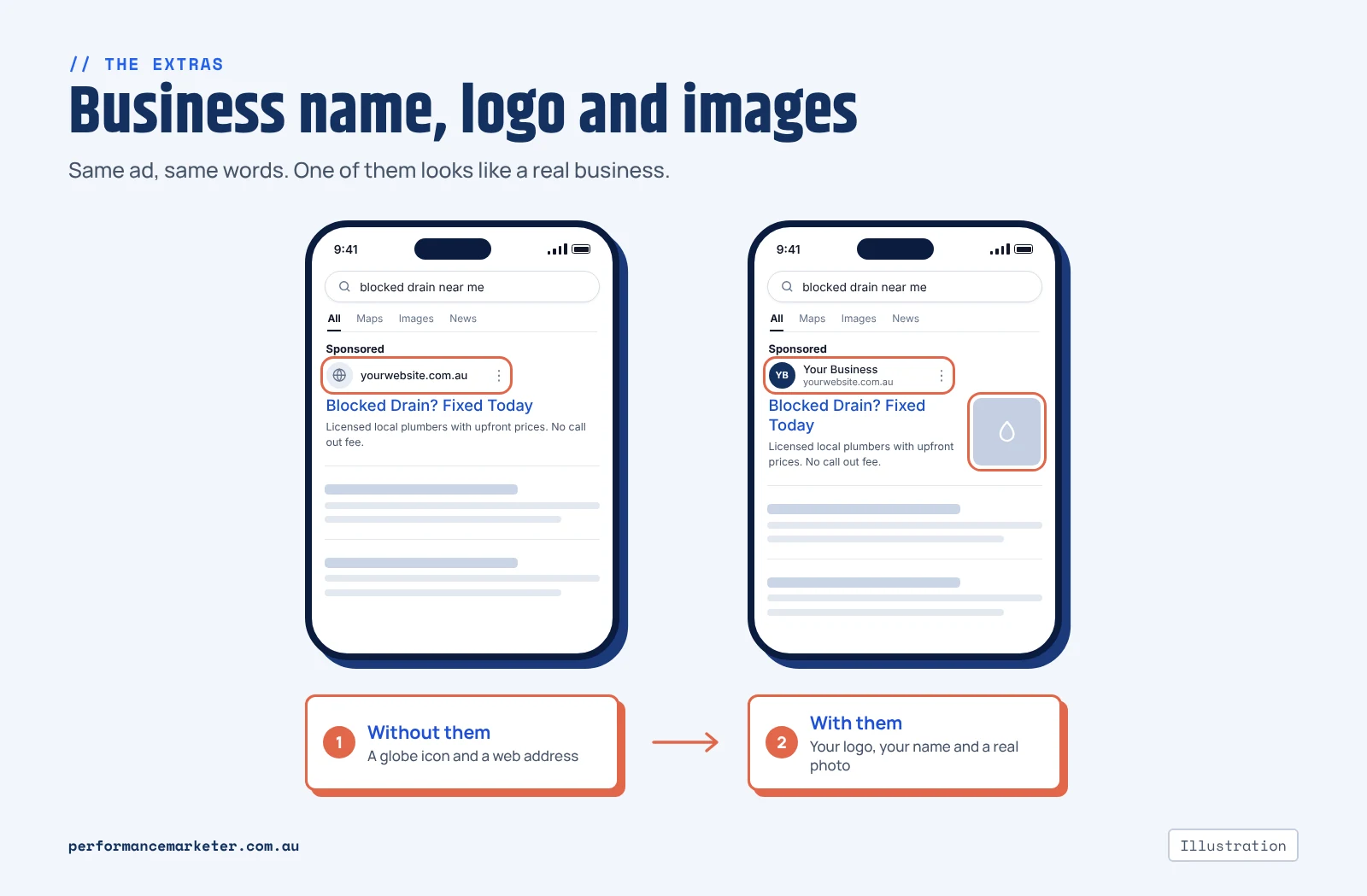
Your business name and logo show at the top of the ad. There are two conditions. Your account has to pass advertiser verification. And the name has to match your domain or your verified legal name.
Skip this and Google shows a plain globe icon beside your web address. Verification can take a week to come through. The upload itself is quick. I’d do it on every account.
What the numbers tell you
Go to Campaigns, then Assets. You’ll see a table of every asset with its clicks, impressions and cost.
Be careful reading it.
The clicks against a sitelink are clicks on the ad while that sitelink was showing. That includes taps on the headline. Google lets you segment the table to split the two. Do that before you decide a sitelink is “working”.
Calls work like this.
→ You turn on call reporting.
→ Google swaps your number for a forwarding number on the ad.
→ Calls get counted under a conversion called “Calls from ads”.
In Australia, a call counts once it runs longer than the length you set.
(Google has a newer option where AI listens to the recording and decides if the call was a real lead. It needs call recording. For now that only works when both phones are in the US or Canada.)
So pick the length with some care. Too short, and every wrong number becomes a conversion. Then your bidding starts chasing wrong numbers.
It also helps to know how small this number can be.
On one dental practice’s account, 3 of the first 62 enquiries were calls straight from the ad. The other 59 came through the website.
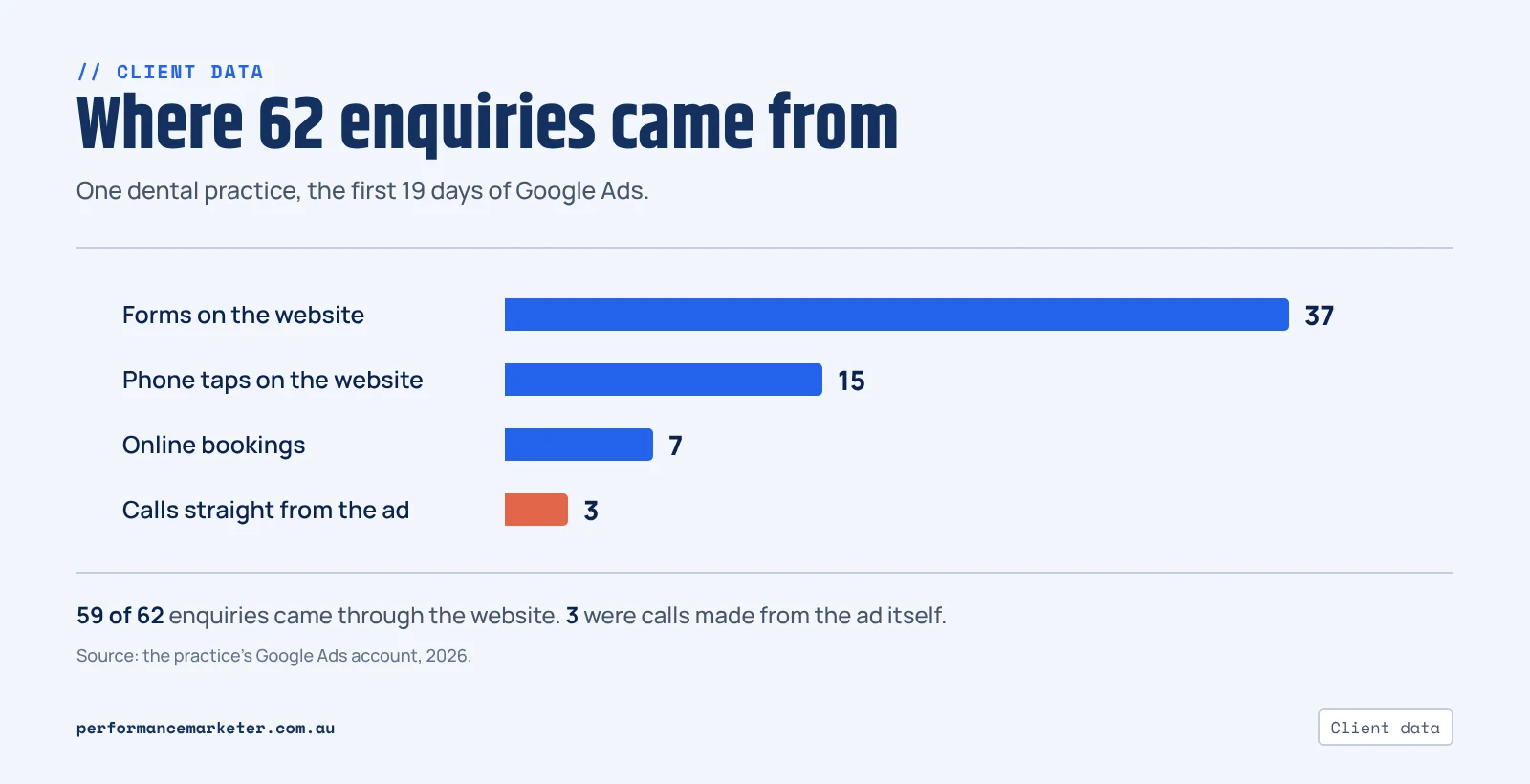
I’d expect an emergency plumber to see a bigger share than a dental practice. Either way, the website still has to do its job.
Checking what came in
→ Calls: open the call details report in Google Ads. It lists each call, when it happened and how long it went for.
→ Lead forms: download them from the asset. Better, have them emailed to you or pushed into your CRM.
→ Messages: Google can tell you a chat was started. What was said is in WhatsApp or your messages app. That’s where you find out if it was a real enquiry.
None of this tells you which leads turned into paid work. That part is still on you. It’s the gap between cost per lead and cost per booked job.
What’s changed
A lot has moved in 18 months. Here’s the short history.
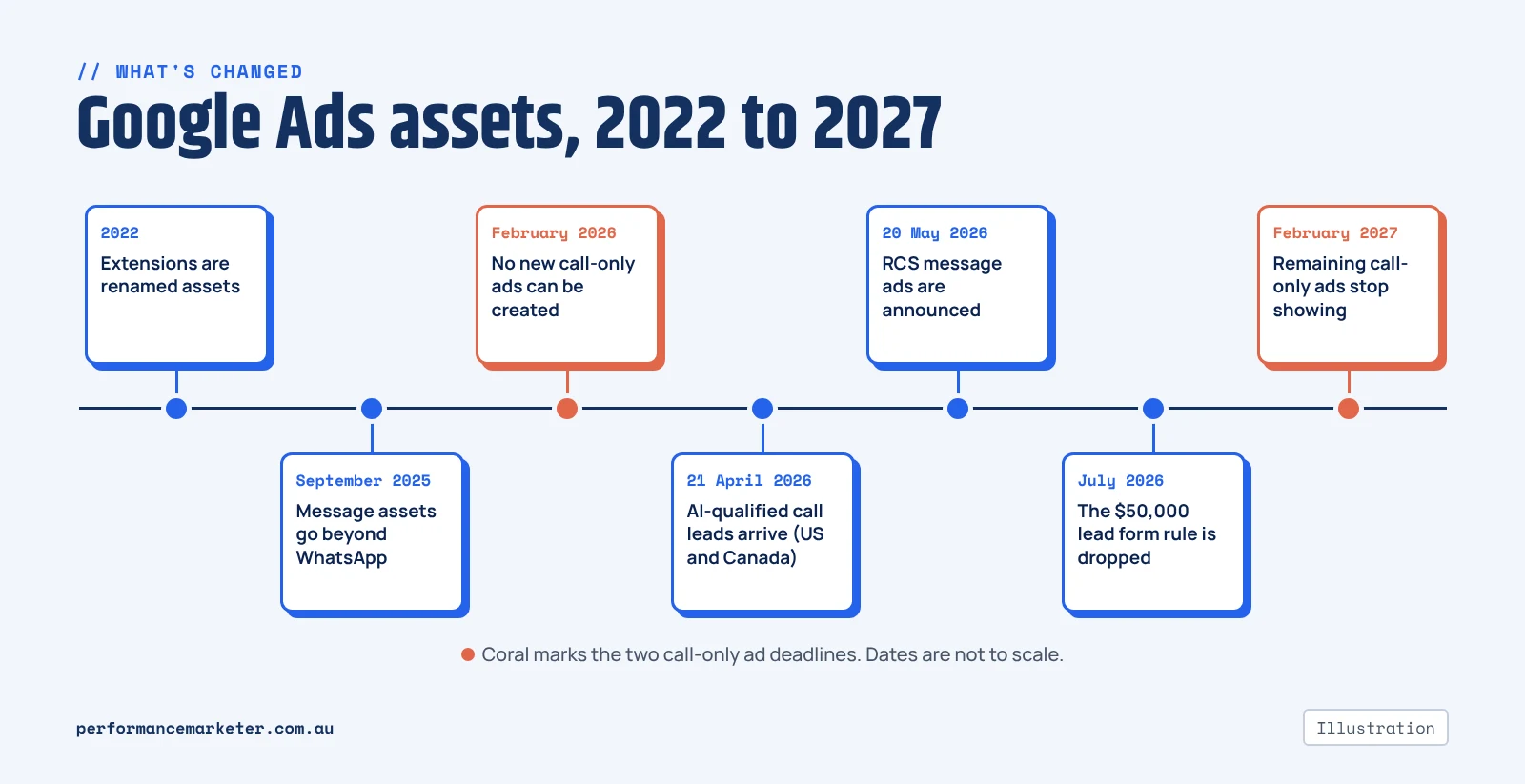
→ 2022: Google renames extensions to assets.
→ September 2025: message assets expand beyond WhatsApp. Google starts requiring advertiser verification for them.
→ February 2026: call-only ads can no longer be created.
→ 21 April 2026: Google publishes AI-qualified call leads. AI reviews recorded calls and only counts the real ones. Recording is limited to the US and Canada.
→ 20 May 2026: Google Marketing Live. Google announces message ads over RCS, plus a “Leads in Google Ads” view for form leads.
→ July 2026: the $50,000 spend requirement disappears from Google’s lead form help page.
→ February 2027: any call-only ads still running stop showing.
Which ones should you use?
Start with the basics on every account. Sitelinks, callouts, structured snippets, a business name and a logo. They cost nothing to add.
Then put one way of making contact on top. Which one depends on how your customers like to reach you.
| If you are | Start with |
|---|---|
| Emergency trade (plumber, electrician, locksmith) | Call asset |
| Quote-based trade (builder, renovator, landscaper) | Call and image assets (the message asset once your account has it) |
| Clinic or allied health | Call and location assets |
| Professional service (accountant, broker, lawyer) | Lead form |
| Online store | Promotion, price and image assets |
I’d run one contact asset first and add a second after a month. Switch on calls, messages and a lead form on the same day? You won’t know which one brought the good leads.
How to turn them on
- In Google Ads, open Campaigns, then Assets.
- Click the blue plus button and pick the type. Sitelink, Callout, Call, Message, Lead form and so on.
- Choose where it applies: the whole account, one campaign or one ad group. The most specific level wins.
- Fill it in and save. For a call asset, turn on call reporting in your account settings too, so the calls get counted.
- Give it a day for review. Then go back to the Assets table and check it’s approved and getting impressions.
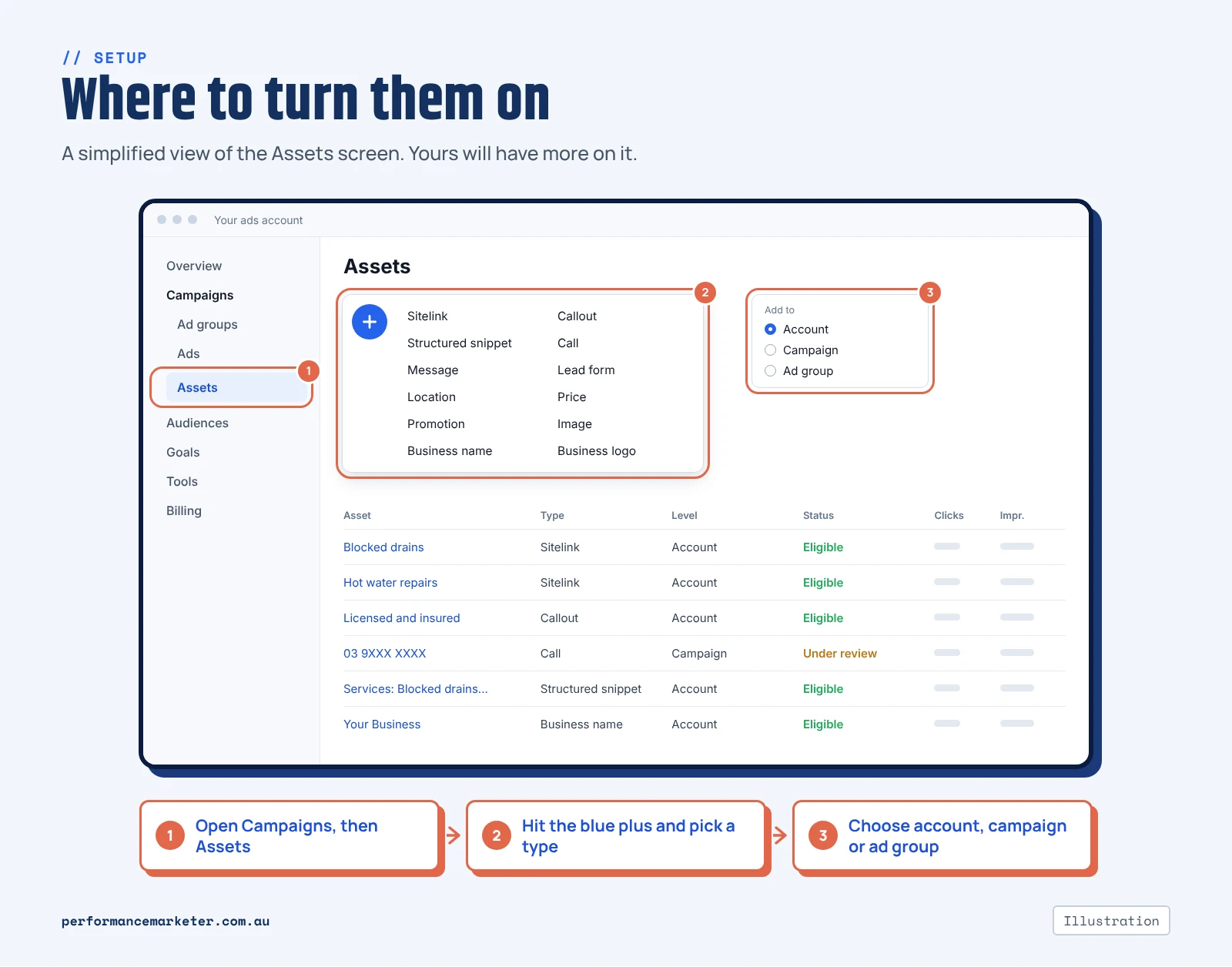
Building a new responsive search ad? The same options are under “More asset types” in the ad editor. Lead forms ask you to accept Google’s terms the first time. Business name and logo are in the same Assets screen.
Questions people ask me about Google Ads assets
Are Google Ads extensions and assets the same thing?
Yes. Google renamed extensions to assets in 2022. A sitelink extension is a sitelink asset. A call extension is a call asset. You’ll still hear both names, in guides and from agencies.
Which assets can Google add automatically?
Sitelinks, callouts, structured snippets, and your business name and logo. Google builds those from your website. Lead forms, message assets, prices and promotions are ones you set up yourself. You can turn any of the automatic ones off in the account-level automated assets settings.
Why aren’t my assets showing?
Usually it’s one of three things.
The asset is still in review, or it was disapproved. Check its status first.
Your ad is showing too far down the page. Google gives the top spots first go at assets.
Or there aren’t enough of them yet. Sitelinks and callouts both need at least two.
Even when all that’s in order, Google only shows an asset when it expects it to help. No asset shows every time.
Will calls and lead forms from the ad show up in Google Analytics?
No. A call from the ad, a chat and a lead form all happen on Google. Nobody has reached your website yet, so Google Analytics never sees them. They’re counted inside Google Ads. To line them up with everything else, send them to the same CRM as your website leads. Tag where each one came from.
Want a second pair of eyes on yours?
We set up and manage Google Ads and Facebook ads for trades, clinics, professional services and online stores. That includes the tracking behind calls and forms. If it would help to go through your assets together, I’m happy to talk it through.